
EV powertrain
Run a real motor, controller and battery on the bench, with a live dashboard.
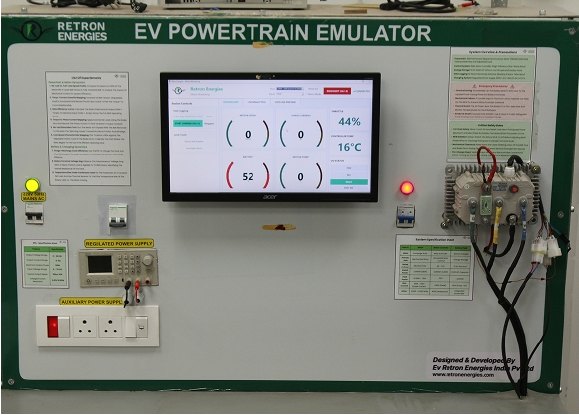
The significance of this zone.
The motor and controller decide how an EV feels and how far it goes. This zone puts a real motor, controller and battery on a bench with a live dashboard, so students can load, tune and stress them before anything goes on a vehicle.
Mistakes cost a test run, not a vehicle.
Wire a battery, controller and motor and verify the setup
Run no-load, speed and torque tests
Watch phase current and temperature live
Check how the controller protects itself
What students can run here.
System setup and communication
- Powertrain wiring check: battery, controller and PMSM motor
- Set up dashboard communication and verify live data
- Validate hall sensors and position feedback
Motor control and performance
- No-load run and smooth-rotation check
- Speed control at different RPM set-points
- Torque test with brake load
- Acceleration and deceleration profiles
Thermal and electrical analysis
- Phase current balance and waveforms
- Motor temperature rise under sustained load
- Controller heatsink and temperature limits
- Battery voltage sag under load
Protection and safety
- Over-current test: apply excess load and verify the controller cuts off
Equipment and setup.
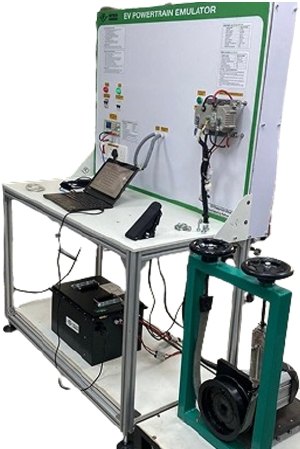
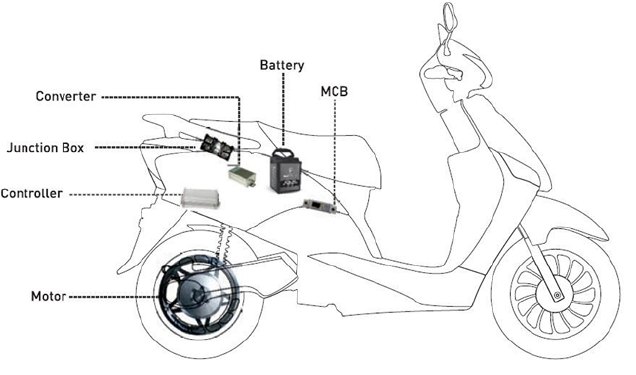
Equipment available
- PMSM motor with motor controller
- Battery pack
- Regulated DC power supply
- Brake load for torque testing
- Oscilloscopes
- Clamp meters and digital multimeters
- Throttle and I/O panel
- EV development workstation
Software
- Retron EV Powertrain Emulator application: live speed, phase current, battery and temperature, with logging
Models and specifications are listed in your proposal.
How students move through it.
Learners start on the LMS and the AI simulator, then run the experiments on the bench.
Indicative curriculum. The final module list is confirmed in your lab proposal.Prerequisites
- No prior powertrain experience is needed
- Basic electrical knowledge helps
- Complete the safety module before first power-up
- Safety and orientationPowertrain safety and lab rules.
- Wiring and communicationConnect the system and bring up the dashboard.
- SensorsHall sensor and feedback checks.
- No-load and speed controlFirst runs and RPM set-points.
- Torque and accelerationBrake-load tests and ramp profiles.
- Thermal and phase currentAnalyse heat and current balance.
- ProtectionValidate controller cut-off.
- ReportingBuild a test report with efficiency analysis.
What learners can do afterwards.
For institutions and for industry.
Colleges and training institutes
- A safe way to teach motor control hands-on
- Students tune real controllers, not simulations only
- Reports with efficiency and performance data
Startups, SMEs and OEM teams
- Check controller and motor pairs on the bench
- Find faults before they reach a vehicle
- Keep logged data from every test run
- Train service engineers on real hardware
Ask about the ev powertrain zone.
Tell us about your institution or project. We reply with the zone details, equipment list and a proposal.